 Website
 Optimisation
 Support
 Training
 Blog
 db8
 Portfolio
 Reviews


Japanese titles and a rooster in Google following a hack: here’s how to sort it out
My website petermartin.nl was hacked and is restored again. Still, some search results in Google have a Japanese title. And next to all search results there is not my own favicon, but a red icon with a white rooster.
So is the site hacked again? (Spoiler: No. Google is simply behind).
On 21 October I wrote about two critical security updates on one day, just after I had updated all my websites. A day later, I discovered that one of my websites had been hacked anyway, via the YOOtheme Pro vulnerability, just a few hours before the security patch was released. In my previous blog you can read how I investigated and restored that site. A few days later it turned out that petermartin.nl was hacked as well. Analysis of the files and the log files showed that here too the vulnerability in YOOtheme Pro was the cause. I restored this site as well and it is clean again. But when you search in Google with site:petermartin.nl, you still see traces of the hack.
In this blog you can read why those Japanese search results and the rooster icon stay visible for weeks after a restore, and what you can do to speed up the cleanup. I use the numbers from Search Console of my own site.
1. What you see in Google is old
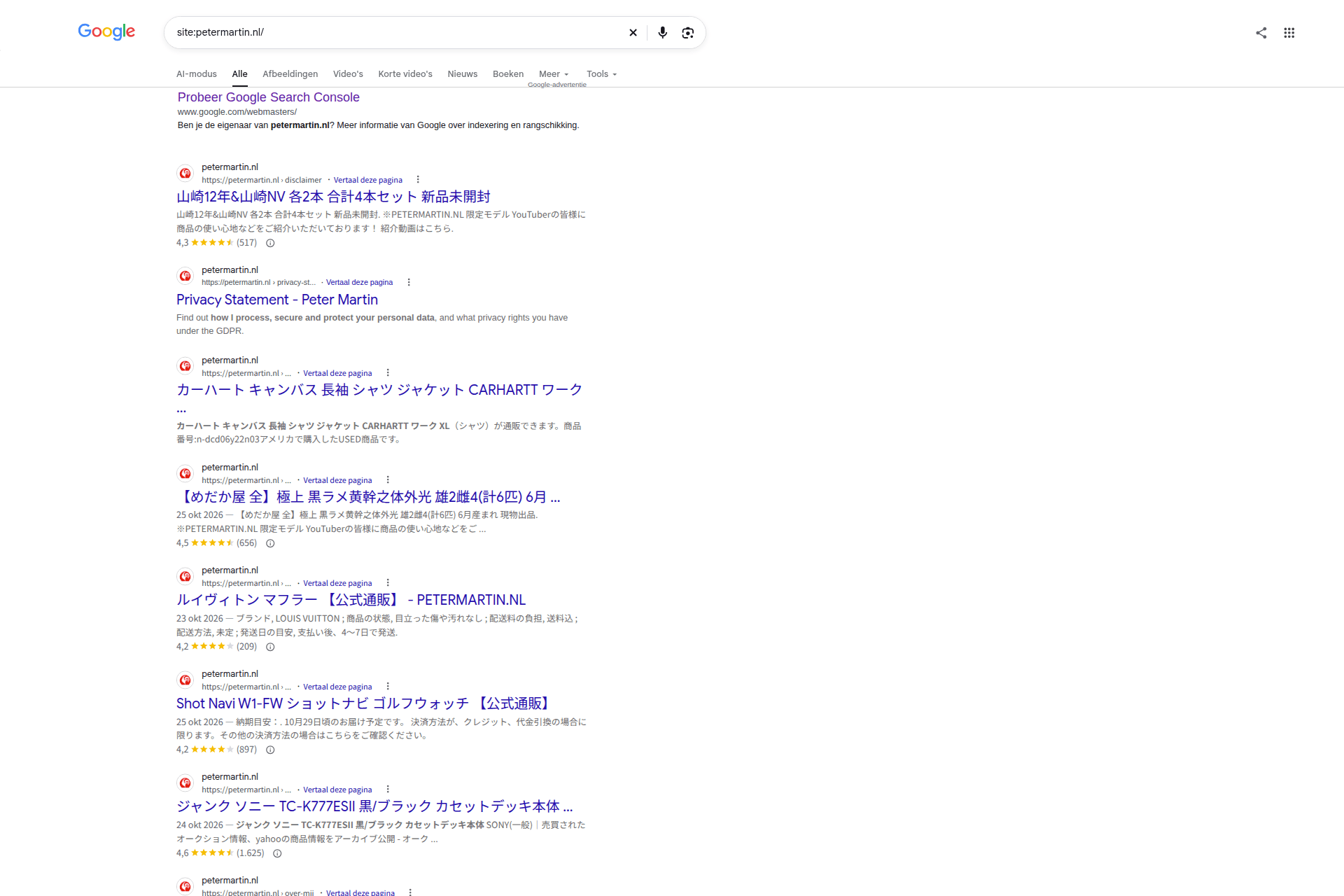
With this hack only search engines like Googlebot got to see the Japanese spam pages. When you opened the site yourself, you just saw the normal website. This is called cloaking, and because of it such a hack is often only noticed in the search results or in Search Console. In that period Google stored those spam pages in its index, with Japanese titles, prices and star ratings.
After the restore the server does not serve that spam anymore. But Google only updates its index when it visits a URL again. Until that moment Google shows what it saw the last time. So what you see in the search results is a snapshot of the period when the hackers were active, not the current state of your website.
1.1 Your real pages can also have a Japanese title
I did not expect this. Google does not only show fake URLs with a Japanese title, but also my own pages. My disclaimer is listed in Google as an offer for Japanese whisky, with 4.3 stars from 517 reviews. My Dutch page "Over mij" (About me) and the sitemap also have a Japanese product title. The English "About me" page has no Japanese text, but it does have the rooster. Other results end with 【公式通販】 - PETERMARTIN.NL, which means "official web shop". So the spam uses my own domain name to look trustworthy. Google even adds "Translate this page".
The explanation: the spam code intercepted the visits of Googlebot before Joomla could show the page. Because of that Googlebot got spam on every URL, also on existing pages. Those real pages still exist. So a 410 is not the solution there. Google simply has to crawl them again and see the real content.
1.2 What Search Console shows
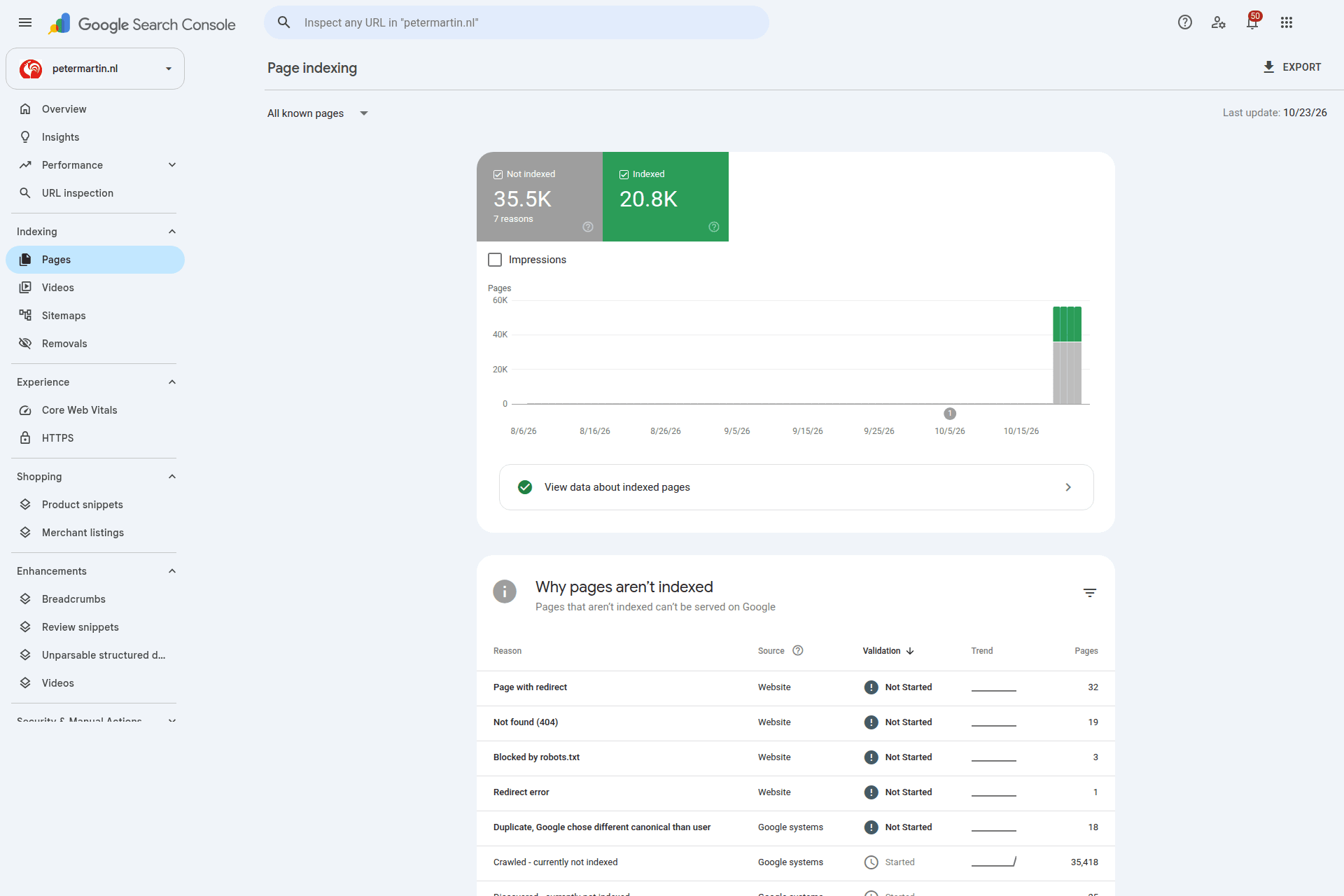
My site has a little under 600 pages. The sitemaps contain 277 English and 268 Dutch links. Still, on 4 November Search Console counted:
- 20,800 indexed pages, so more than thirty times as many as the site really has;
- 35,500 not indexed pages, of which 35,418 with the reason Crawled - currently not indexed.
Almost all of those URLs are spam that Googlebot found during the hack. The difference between the number of indexed pages and the number of pages in your sitemap is a good measure of how much spam is still in Google.
Also look at the date in the top right corner of the report. On 4 November mine still said "Last update: 10/23/26". So the report itself is also almost two weeks behind. The numbers show the situation from just after the restore, not the situation of today.
2. The rooster icon
The red icon with the white rooster is the logo of Komeri (コメリ), a large and well-known Japanese chain of DIY stores. Komeri has nothing to do with the hack and is just as much a victim. The hackers use the logo because it creates trust.
The rooster does not only appear in the search results. In Search Console itself it is also shown as the icon next to my property.
2.1 Why a well-known Japanese logo?
This type of SEO spam is called the Japanese keyword hack. The hackers create thousands of Japanese spam pages on your domain, mostly for counterfeit products or fake web shops. They target Google.co.jp and take advantage of the good reputation that your domain has built up with Google.
Google shows the favicon next to every search result. A Japanese user who sees a familiar logo is more likely to click. That is why the rooster is there.
2.2 My own favicon was not changed
I expected that the hackers had replaced my favicon.ico. That turned out not to be the case. I compared the favicons of the hacked site with a clean copy: they were identical. There was also no Komeri image or a reference to it anywhere on the server.
The most likely explanation is the cloaking. Googlebot did not get my homepage, but spam HTML that the script fetched live from the server of the attacker. In that HTML you decide yourself which favicon you use. So Google saw a homepage with the Komeri logo as favicon, and stored that. That is why nothing of it could be found on my server.
So after a hack, do not only check if your favicon.ico was changed. Even when that file is clean, Google may have seen a different favicon.
2.3 Why the rooster stays
Google uses one favicon per hostname. That is why the rooster is not only shown next to the spam pages, but also next to your real pages.
Google does not fetch the favicon again on every visit. The favicon is updated when Google crawls and processes your homepage again. According to Google this can take several days to several weeks. Only when Google has seen your clean homepage, the rooster disappears.
3. Why the spam URLs are not gone at once
In Search Console I saw two types of spam URLs:
- Paths, like
/product/19772966,/itemgoods/24373094and/shops/reviews/eu9cumxea6xv6je. These do not exist in Joomla, so Joomla already returns a404 Not Founditself. You do not have to do anything for those. - Query strings on the homepage, like
/?z=fdad7bybnp2oc0j. Joomla ignores those query strings and just shows the homepage with status200. For Google the page then still exists.
For those query strings I configured nginx so that they return the HTTP status code 410 Gone:
# Spam URLs from the hack: 410 Gone
if ($args ~* "^([a-z-]+/[0-9]{8,}|c=[a-z0-9]{10,}|z=[a-z0-9]{10,})$") { return 410; }
location ~* "^/(inx_sitemap\.xml|[a-z_-]*sub[a-z0-9_-]*\.xml)$" { return 410; }
The patterns are different per site. On the site from my previous blog the spam only used c=, on petermartin.nl z= was added. So adjust the patterns to what you see in your own log files and in Search Console, and check that your real URLs do not match them.
A 404 or a 410: for Google it does not make much difference. According to the documentation of Google all 4xx status codes, except 429, are treated the same: the page does not exist and is removed from the index. For the query strings I still use a 410, because it says most clearly that the page was removed on purpose. What matters most is that it is not a 200.
But Google first has to visit every spam URL again to see that 404 or 410. With tens of thousands of URLs that does not happen in one day. Google spreads the crawling over days and weeks, so your server does not get overloaded. Every time Googlebot visits a spam URL and gets a 404 or 410, that URL disappears from the index. So the number of Japanese results goes down step by step.
That is why you should not block the spam URLs via robots.txt. Then Google cannot visit them anymore, never sees the 404 or 410, and they actually stay longer.
4. How to speed up the recovery
Mostly it is waiting until Google has crawled your site again. With these steps in Google Search Console you check if your restore really worked, and you give Google a small push in the right direction.
4.1 Check what Google really sees now
With cloaking you cannot rely on what you see in your browser. After all, the hack also showed the normal site to normal visitors. So use the URL inspection in Search Console:
- Go to URL inspection and enter a URL that still shows a Japanese title in Google.
- Click Test live URL.
- Look at the fetched HTML and the status code.
With the live test Google fetches the page directly as Googlebot. Do you see the status 404 or 410 for a spam URL, or your own clean HTML for a real page? Then your server does not serve spam to Google anymore, and the search results only show old data. Do you still see Japanese text? Then your site is not clean yet.
4.2 Check the favicon and request indexing
The favicon and the most important title and description of your site belong to your homepage. So first check which favicon Googlebot gets on your homepage now.
Do not look at the source code in your browser for this. With cloaking your browser always gets the normal site, with your own favicon, even when the site is still hacked. A check with curl and the user agent of Googlebot is not enough either: spam code can also look at the IP address. Only the live test in Search Console fetches the page from the servers of Google, and shows what Googlebot really gets:
- Go to URL inspection and enter your homepage, for example
https://yourdomain.com/. - Click Test live URL.
- Click View tested page. On the right a panel opens with the tabs HTML, Screenshot and More info.
- In the HTML tab, search for
icon.
For petermartin.nl it now looks like this:
<link href="/images/brand/favicon.png" rel="icon" sizes="any">
<link href="/images/brand/favicon.svg" rel="icon" type="image/svg+xml">
<link href="/images/brand/apple-touch-icon.png" rel="apple-touch-icon">
<link href="/favicon.ico" rel="icon" type="image/vnd.microsoft.icon">
All lines refer to my own files. So the rooster only comes from the memory of Google, and disappears as soon as Google has processed the homepage again.
Do you see a reference to a file that you do not know, or to another domain? Then Googlebot still gets different HTML than you. Then your site is not clean yet. Usually you then also see Japanese text in the same HTML.
If everything is correct, click Request indexing. With that you ask Google to crawl the homepage again. This is also the method that Google itself mentions to pick up a changed favicon faster. It is a request, not a guarantee: Google decides itself when it comes by.
Do the same for your most important real pages that still have a Japanese title in Google, like the disclaimer and "Over mij" in my case. Those pages do not disappear by themselves with a 404 or 410, because they simply exist. They are only shown correctly again after Google has crawled them again.
If you put a new favicon in place after the hack, keep the requirements of Google in mind:
- The favicon is square and at least 8 × 8 pixels. Google recommends larger than 48 × 48 pixels.
- The file returns status
200and the URL stays the same. - The homepage is not blocked for Googlebot, and the favicon file is not blocked for Googlebot-Image, for example via
robots.txt. - Google uses one favicon per hostname. So you cannot show a different favicon per page.
4.3 Hide the spam temporarily with the Removals tool
You cannot request a removal for thousands of spam URLs one by one. You do not have to. In the Removals tool you can choose Remove all URLs with this prefix for a temporary removal. For spam paths you can do this per folder, like https://yourdomain.com/product/ or https://yourdomain.com/shops/, if your own site has no pages that start with that.
For query strings this does not work. I tried to add the prefix https://petermartin.nl/?z=. Search Console then warned that my entire domain would not be visible in Google for six months. Apparently Search Console ignores the question mark and everything after it. Then https://petermartin.nl/ is left, and that is the whole site. So for the query string URLs you have to rely on the 410.
Three things to pay attention to:
- Read the confirmation in Search Console carefully before you submit a removal. If it says that your entire site will be hidden, cancel.
- A temporary removal hides the URLs for about six months, but does not remove them from the index. For that you need the 404 or 410. Use the two together.
- Never request a removal for your homepage or other real pages, not even when they still have a Japanese title. Then you hide exactly the pages that you want to show. So check carefully that your prefix only matches spam URLs.
4.4 Keep track of what is left
A normal site: search does not show all spam. So also search for Japanese words that often appear in this spam, like 通販 (mail order, web shop) and 日本 (Japan). On my site 通販 was in many titles, as part of 公式通販 (official web shop):
site:yourdomain.com 通販
site:yourdomain.com 日本
This does not give a complete list either. So also look in Search Console under Page indexing. Compare the number of indexed pages with the number of URLs in your sitemap. For me that is now 20,800 against about 550. Check it every week: the difference should go down step by step. Each time, also look at the date of the last update of the report.
The other checks in Search Console, like unknown owners, unknown sitemaps and manual actions, are in my previous blog in step 5.6.
5. Patience
It is frustrating to still see Japanese titles and a rooster next to your website after all that work. But if the live test in Search Console shows clean HTML or a 404 or 410, you did everything right technically. The rest is waiting for Google. Expect two to eight weeks before the search results are fully correct again. I keep track of the numbers of my own site and will update this blog as soon as the rooster is gone.
6. Sources
- Google Search Central: Define a favicon to show in search results
- Google Search Central: How HTTP status codes, and network and DNS errors affect Google Search
- Google Search Central: Large site owner's guide to managing your crawl budget
- Search Console Help: Removals and SafeSearch reports tool
- web.dev: Fixing the Japanese keyword hack


